 Crios
Crios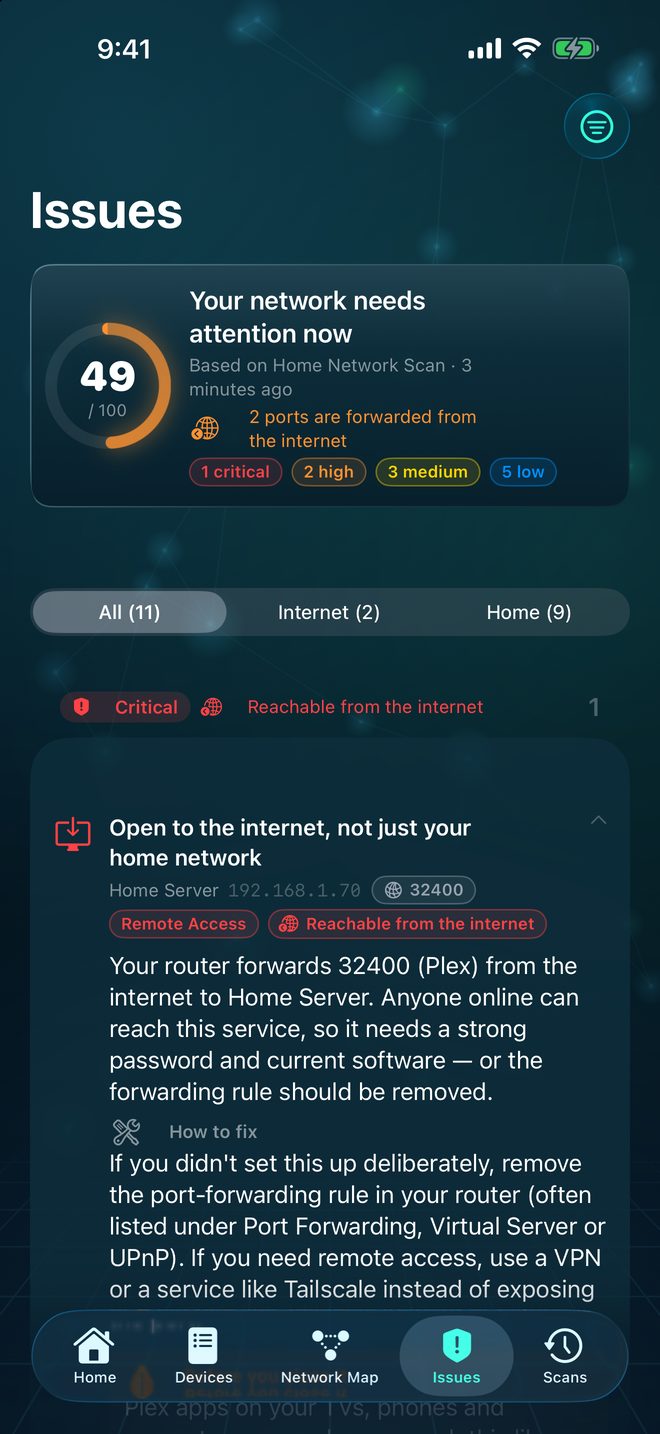
Two very different audiences
Your router sits between your home and the internet. By default it lets your devices reach out, but doesn't let the internet reach in. An open port on a laptop is therefore visible only to other devices on your network, a small audience of people and gadgets you mostly know.
That changes when the router forwards a port: it takes connections arriving from the internet on that port and hands them to a device inside. Now the audience is everyone online, including automated scanners that probe the whole internet around the clock.
How Crios checks what's forwarded
Most home routers support UPnP, a protocol apps use to request port forwards automatically. Crios uses the same protocol, read‑only, to ask your router for its current list of forwarding rules. It never adds or removes a rule.
It then marks every finding with its reach:
- Reachable from the internet The router forwards this exact port to this device.
- Home network only The router answered and forwards nothing for this port.
- Home network The router didn't answer the query, so only local reach is certain.
How reach changes severity
Crios adjusts severity for findings about network exposure: a finding on a forwarded port moves up one level; one your router confirmed is home‑only moves down one level, but never below Low, because a guest device or malware on your Wi‑Fi still counts. Findings that aren't about exposure, such as a new device, are never adjusted. Expand any finding to see the reason, for example: “Lowered from Critical to High because only devices on your home network can reach it.”
On the Issues tab, switch between All, Internet and Home. Work through Internet first.
Where unexpected forwards come from
- Game consoles request forwards over UPnP for online play.
- Media servers such as Plex open their port for streaming away from home.
- VPN and mesh tools like Tailscale may request a UDP forward to connect directly.
- Old rules you or an installer added years ago and forgot.
Crios lists every forwarding rule the router reports, even ones on UDP or for devices that are offline, as a separate finding so nothing hides.
Closing a forward you don't need
- Open your router's app or admin page. Look for Port Forwarding, Virtual Server or UPnP.
- Remove the rule, or turn the service off in the app that created it.
- If you don't rely on automatic forwarding, turn UPnP off. Consoles may need manual rules afterwards.
- Run a new network scan. The finding should drop to Home network only, or disappear.
Rules you typed into the router by hand aren't always reported over UPnP, and some routers don't support the query at all. When Crios can't confirm, it says Home network rather than claiming nothing is exposed. If you've set up manual forwards, check them in the router too.
Need remote access? Use a safer route
If you forward a port so you can reach a device from outside, consider a VPN instead: your router's built‑in VPN server, or a mesh VPN. You keep remote access without exposing the service to the whole internet.